C-Pen USA  Authorized US Distributor
Tel.: (888) 254-3879
C-Pen USA Home C-Pen USA Support C-Pen USA Online Store  
C-Pen Products
Hosted Models
Standalone Models
C-Pen 20
C-Dictionary
C-Pen Add-Ins
C-Pen Applications
Selective Scanning
Learning Aid
Custom Integration
How to Buy
Buy Online
Retail Stores
Help and Support
US Warranty
Contact Us
Resources
C-Pen Home
C-Pen FAQ
C-Pen Dictionaries


  C-Pen 20 Handheld Scanner
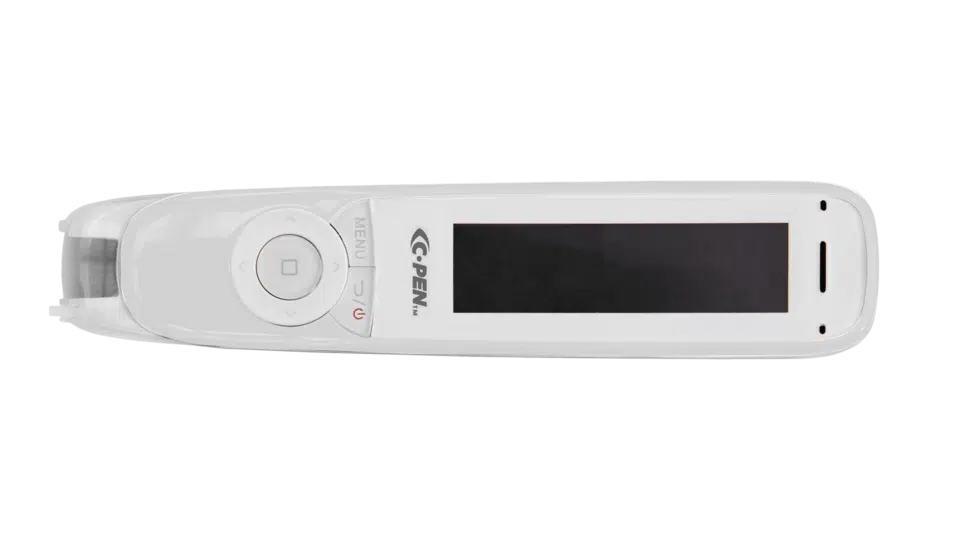
Click to enlarge C-Pen 20 Pen Scanner scans text, numbers, barcodes and small images from forms, invoices and other printed or hand-printed documents/books/magazines. C-Pen recognizes text in over 167 languages. The scanned data is transferred immediately into your PC, MAC, laptop or Windows based handheld device.

What you can do with C-Pen 20
Scan text and digits
Scan text and digits selectively from any printed or hand-printed paper source into cursor position on your PC screen. The text scanned is editable and transferred in the font and format selected in your open Windows application.
Scan banking fonts
Scan and input banking fonts such as OCR-A, OCR-B and MICR (E13B) directly into any Windows application.
Scan barcodes
C-Pen scans and reads barcodes, such Code 39, UPC-A, UCC Code 128 and others into any Windows application of your choice. For a full list of barcodes please see Tech Specs for C-Pen 20.
Scan small images
C-Pen 20 Image Add-In allows the user to scan and save small images, such as signatures or handwritten notes with C-Pen 20. Each C-pen stroke will be saved as a black and white image rather than an editable text. Images can be scanned directly into any application that is capable of accepting and displaying images such as: MS Word, MS Excel, MS Notes, WordPad and others.
Speak scanned text aloud
C-Pen Text to Speech Add-In adds speech synthesis technology to the scanning process. With this feature C-Pen will read aloud the scanned text using default PC speaker device. This feature also allows you to verify data in the process of scanning without looking at the screen.
Use C-Pen 20 as a mouse
Use C-Pen 20 as a mouse by moving it over the special C-Pen mouse pad. Using C-Pen as a mouse gives an additional advantage in navigation.
C-Pen 20 Kit Includes
  • C-Pen with USB connector
  • Software
  • User's Guide

    C-Pen 20 Links
  • Buy C-Pen 20 Online
  • C-Pen 20 Brochure
  • C-Pen 20 Manual
  • C-Pen 20 Downloads
  • Contact Us

  • C-Pen 20
    C-Dictionary Package vs. Basic C-Pen 20 Package
    C-Dictionary C-Pen is compatible with free C-Pen 20 Software, but also possesses distinct features that set it apart from C-Pen 20 package. C-Dictionary package have the following advantages over C-Pen 20 package:

    ● C-Dictionary hardware has Vista 64 bit support. If you have Vista 64, this is a package that will perfectly suit you.

    ● C- Dictionary hardware has a convenient cradle to hold the pen in place on your desktop.

    ● C-Dictionary C-Pen 20 is compatible with USB Host capable Pocket PC 2003 and Windows Mobile 5.x/6.x based devices. ( Beta Version available for test. Call for details. )

    Technical specifications
    Processor: Custom Argus Font Size: 5-22 pt.
    Reading speed: 15 sm/s (6 in/s) Battery: Uses USB port
    Dimensions: 131 x 19 x 31 mm
    (5.1 x 0.74 x 1.2 in)
    Weight: 83 g (3 oz)
    1D Barcode types: Check Code 39, Check Interleaved 25, Code 128, Code 39, EAN 13, EAN 8, Interleaved 25, CODABAR (without checksum), UCC Code 128, Code 2 of 5 (Industrial, lATA, Matrix), Code 93, UPC-A, UPC-E and Postnet. Banking fonts: OCR-A, OCR-B and MICR (E13B)
    Image Resolution: Grayscale 330 DPI
    Scan Area Size: 10 x 6 mm
    Main languages: Armenian (Eastern, Western, Grabar), Bulgarian, Catalan, Croatian, Czech, Danish, Dutch (The Netherlands and Belgium), English, Estonian, Finnish, French, German (new and old spelling), Greek, Hungarian, Italian, Latvian, Lithuanian, Norwegian (Nynorsk and Bokmal), Polish, Portuguese (Portugal and Brazil), Romanian, Russian, Slovak, Spanish, Swedish, Tatar, Turkish and Ukrainian. Additional Languages: 133 Additional Languages with Latin, Cyrillic or Greek characters
    Compatibility: Windows 98/2000/Me/XP/Vista 32
    MAC OS X 10.5 Leopard
    System requirements
    (Windows):
    IBM compatible PC Intel Pentium 200 MHz or higher processor, 64 MB RAM, 290 MB free hard-disk space, USB connection.

    ©2004 C-Pen USA. All rights reserved.